Acceptable Use Policies (AUP)

The definition of acceptable use policy according to the United States Department of Education National Center for Education Statistics states the “purpose of such a policy is to inform users of the ground rules on web use, thereby protecting them and the education organization from violations of law, practices that would damage the system, or misunderstandings regarding responsibility for user actions.” (n.d.).  Their website goes on to provide guidelines for posting information on a school’s website, types of content to include, usability guidelines, student’s rights, cyberbullying, netiquette, social media, and copyright compliance.  The website is very informative and highly recommended to review before creating your own school’s website. 

In addition to the recommendation of what to include on your website, it also gives guidelines about the rights and responsibilities of both students and teachers within the school. A couple things I noticed while researching this is that each one is just a little different. Some are more inclusive than others, some are updated every school year, and some give repercussions of not following them. Almost all of them require the students and/or parent to sign and return the form to the school every year.

Acceptable Use Policies are there for the protection of the students, teachers, and school. According to Education World, most AUPs are broken down into several categories including a “preamble, a definition section, a policy statement, an acceptable use section, an unacceptable use section and a violations sections” (2009). While the preamble focuses mainly on the goals and why it is needed; the definition section focuses on clearly identifying the meaning of words like computer network and educational purpose. Following this you usually find the policy section which describes the types of computer use the students can have. The acceptable and non-acceptable sections obviously describe what should and should not be done and the importance of digital citizenship. Finally, the violations section will explain in detail the repercussions of not following the policy. Unless the student is over 18 years of age, the policy is usually signed by both the parent and the student.

Here are a few examples of Acceptable Use Policies (AUP) from educational facilities that I reviewed:

Seattle Public School District

Portland Public School District

Everett Public School District

Columbia School District

As more and more schools and students connect to the internet every year, it is becoming even more important that we guide our students to become good digital citizens. In addition to the students signing the policy, it is very important that teachers review this information in class, throughout the school year, to help our students understand how important this is.

References:

Education World. (2009). Getting started on the internet: Developing an
acceptable use policy (AUP).
https://www.educationworld.com/a_curr/curr093.shtml

Emma. (2019, June 3). Federal law and acceptable use policies. https://learnsafe.com/federal-law-and-acceptable-use-policies/

National Center for Education Statistics. (n.d.). https://nces.ed.gov/pubs2005/tech_suite/app_C.asp

The “Basic Suite” for Learning

The ways of using Suite programs in the classroom are endless. Whether you are using Google G Suite or Microsoft Office Suite, the powerful tools incorporated into these programs can transform any classroom into a technology wonderland! Regardless of grade level, there is always something you can create using Google. Thinking there were probably only a few ways to have a first grader use Google Sheets, I was surprised to find a large assortment of ideas including creating custom coloring pictures by having students color in the squares to create a picture, to Skittles candy sorting, to favorite holiday survey results. Moving up in the grade levels will only increase the project ideas and difficulty levels of the lessons you can create using Google Sheets. From a teacher’s standpoint, Sheets can be used for tracking attendance, averaging grades, tracking assessment and growth over time, inventory of classroom supplies, or even something as simple as making a math worksheet.

Another Google Suite program that is great for the classroom is Google Slides. This program is perfect for students working together in a hybrid or remote learning environment.  Regardless of the student’s location, a group of peers can collaborate on creating a portfolio-type project on any subject or idea.  The program includes template for standard page layouts, or students can use their creativity and arrange their slide to create dramatic effects or to incorporate videos and narrations.

The opportunities do not end there – I could go on to describe the benefits of Google Classroom, Forms, Sites, Keep, Photos, Chat, Calendar, Meet, and Gmail. I remember years ago when everyone was saying, “there’s an app for that!” The same could be said now with Google Suite.  For all of your needs, there is a program to accomplish that task. In addition, the programs are so easy to use that incorporating technology into your lessons will not only enhance them, but it will engage your students at a level of learning that was never before possible.

One of the relative advantages of using Google Suite is the ease of use. Whether you are using Slides, Doc, Sheets, or Sites, students can create professional looking work. I would like to say students are only limited by their own creativity, but even that is not true. Even for students that feel they are not creative, there are ways to make a great presentation.  If you are unsure where to start, choose one of the pre-made templates and color schemes and start adding text and images. Google has created a program where you can easily add items to your presentation with just the click of a button – adding videos, images, hyperlinks, and recordings. For those tasks that are difficult to figure out, Google has even included a “help” button to answer all your questions.

My favorite advantage to using Google Suite is the collaboration tool that is built into all their programs. With more students working remotely, it is easy for students to work on projects both during class time and outside of class time. Multiple students can be working on the same document at the same time and teachers can view the work in real time.  An added benefit includes the ability for teachers (and students) to leave comments on the project so students receive instant feedback throughout the length of the project timeline.

Finally, the save-as-you-go feature that is standard in all Google programs is great.  I remember years ago typing an entire report only to have my computer crash in the middle of the last paragraph! It is so easy to get deeply engrossed in the work you are doing and completely forget to save your project. Gone are the days of starting from scratch and trying to remember everything you did. From the large variety of programs to fit all your needs, to the ease of using each programs, I think adding Google Suite is a perfect addition to your classroom resources.

Future Trends

Future Trends:

Hurdles & Accelerators

According to the 2020 Hurdles and Accelerators Report, the Advisory Board has identified five key hurdles and five key accelerators that schools should address in 2020. Among the hurdles were scaling and sustaining innovation, data privacy, evolution of teaching and learning, pedagogy versus the technology gap, and digital equity.  Among the top five accelerators were learners as creators, data-driven practices, personalization, social and emotional learning, and building the human capacity of leaders (CoSN, 2020). Immediately I notice the similarities of these categories with the AECT Standards for technology. Common in both areas you find pedagogy, leadership, diversity of learners, and technology supported learning. I am sure that if we unpack the standards even further, we will find more similarities. I think we all can agree that education from the standpoint of both teacher and student has changed significantly in 2020.  Technology has been thrust into the foreground for many schools across the country. In order to make remote learning work for all stakeholders, both students and teachers will need to learn to use technology responsibly to engage students, advance learning, and protect the privacy of all.

As a member of the administration team in my school district, our focus is a little broader than within one classroom. However, just like a teacher in a classroom, or a principal of a school; we also use data in everything we do.  Seeing it as the spotlight topic for the report did not surprise me. As more and more lessons are taught online, and more and more classrooms begin using online programs for their lessons; I agree with the report that privacy should be a key issue for all stakeholders. We know that technology and data collection is a driving force for today’s learning environments. Teachers need data to drive their lessons and assure that all students are reaching their learning potential. Students need the feedback that many online programs and teachers provide to help them become active participants in their learning. In my selected content area of math for 2nd graders, I believe privacy is especially important.  At this age, students follow the lead and recommendation of other students, are intrigued by highly interactive websites, and enjoy the visual attraction of them.  The thing they do not think about when selecting a game to play is what kind of information the website collects about them.  It is the responsibility of parents and teachers to guide the students through this process. After reading this article, I believe this should be a main discussion focus for staff meetings across the country. How much research goes into selecting a program to use?  Is it the choice of each teacher, or are the choices presented to administration for review prior to implementation?  As a new teacher, I find myself searching review website to gain as much information about different programs as possible, prior to using them.  In addition, working with professional learning networks is very beneficial in finding the pros and cons of online programs. Moving forward in my lesson design, program research will be a very large part of choosing my technology. I will be looking for information on the programs website about the information they collect, how the program can accommodate the learning needs of all my students, and whether it is going to redefine my instruction or simply be a substitution for my lessons.

Another point to note in the article states insufficient professional development can prevent educators from trying new ideas and from successfully uniting technology and pedagogy (CoSN, 2020).  As noted above, working together in professional learning networks is a great avenue for increasing your knowledge about technology.  Moving forward, I believe I will work harder to not only attend the PD meetings that I find in my district, but also to rally for more opportunities for professional development that center around the use of technology and data.  I am a firm believer that learning never stops.  Even as a teacher, there is always more information that we can learn from colleagues, professional groups, administration, journals, and even things we can learn from our students.  Every meeting we attend brings new information back into the classroom to benefit the students. I want to grow as an educator, not simply repeat the same old lesson over and over, year after year.  Education is ever-evolving and has changed significantly since I was in school.  I believe the student-centered approach to learning that incorporates portfolio assessments helps to engage students and allows them to articulate their knowledge in a real-life format.  I plan to incorporate more hands-on activities into my lesson and limit the amount of direct instruction where the teacher is the center of the room. I would like to encourage students to make choices in their learning that is going to benefit and engage them. Through networking with other teachers, I intend to offer my students opportunities that will highlight their accomplishments and allow all students to meet the requirements, regardless of their learning levels.

Finally, I was fascinated by the many examples the article mentioned of educational practices from around the world. I have always been intrigued by using technology as part of my curriculum to get first-hand accounts of life in other places through Zoom meetings, penpal programs, etc.  However, it never occurred to me to research educational practices from other countries. I always just thought locally (within US), not globally.  I would like to look into this further and see where I can collect “best practices” for students in my grade level for several different curriculum lessons. My belief is that many students this age have not traveled to places around the world and learning in this fashion would be far more engaging than just reading about it in a book or playing an online game about it. Overall, this article was very information and I will take away from it many great ideas.

References

 CoSN. (2020). Driving K-12 innovation: Hurdles + accelerators. Retrieved from https://cosn.org/k12innovation/hurdles-accelerators

Relative Advantages

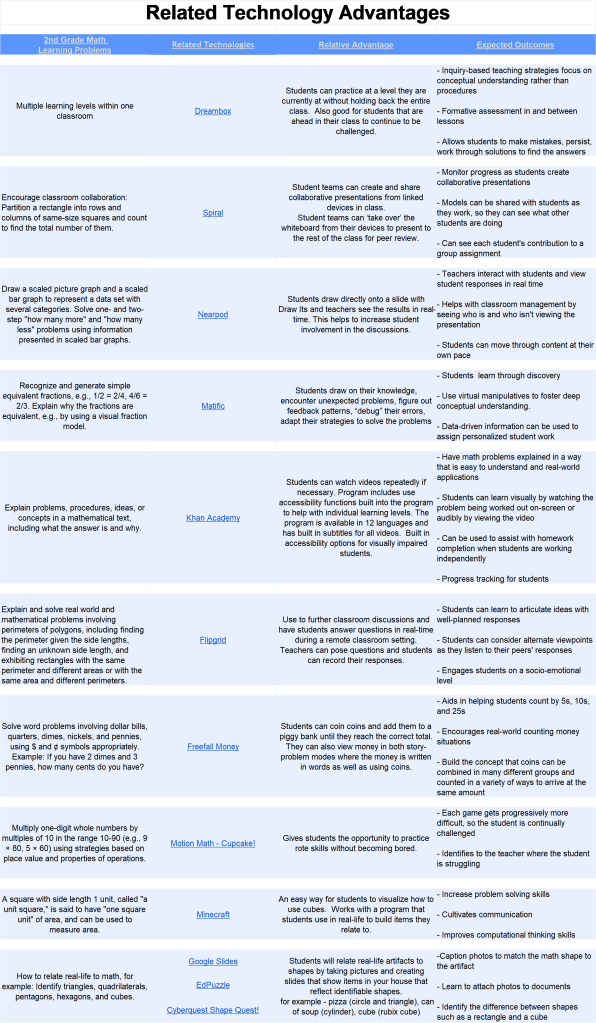
In this week’s class, we were asked to create a spreadsheet that identifies several technology options associated with our themed learning project in regards to relative advantage. My theme will be 2nd grade math class. Looking at the common core state standards for math in second grade, I identified several areas where I believe the use of technology would aid the instruction. I researched several websites for more information on programs recommended for teachers and students. One website which I found to be very helpful was Commonsense.org. Searching each program, I was able to retrieve information which was very beneficial in identifying the pros and cons of many tech programs, how they can be integrated into lessons, feedback from several parents and teachers, and privacy ratings. As expected, one is able to find a multitude of programs that do very similar things. Relying on the recommendations from several websites, I have chosen 10 programs that I believe would be beneficial in a second grade classroom. To complete the template, I have added the learning problem, the relative advantage to using the program, and the outcomes.

Assignment Instructions: Technology-based strategies offer many unique benefits to educators as they look for instructional solutions to problems that students may face with abstract concepts, motivation, and time consuming tasks. Teachers have to consider the benefits of using such methods compared to their current ones and decide if the benefits are worth the additional effort and cost. The first step in the TIP (Technology Integration Planning) model refers to this decision as “relative advantage”.

https://docs.google.com/spreadsheets/d/1B3JZnVkFj1CAzecxupsWjas-BacnKAjPAHbx-80MCOQ/edit?usp=sharing

541